Find the Photo You Need in the Library You Already Have
Find existing images by describing what you need. Use brand context and visible reasons to inspect relevance in the appropriate workflow.
Updated 23 October 2026: Product descriptions now distinguish Library image search from the separate social Post Intelligence workflow. Finding existing assets leads; brand-aware reasons support inspection. No automatic route-to-saved-Work or selection-to-Compose path is claimed. Original publication date retained.
You remember the shot, but not the filename. Or you know the work you are making and need an image from the library to support it. Both are asset-finding needs.
A useful smart DAM helps explore existing assets and inspect their relevance. Some requests are literal image descriptions; others carry marketing context. Neither needs a formal brief.
Start with first-class semantic search
Semantic search matters because people do not remember assets as filenames and exact tags. They remember moments, moods, subjects, compositions, campaigns, and half-formed visual ideas.
In DAMdaryl, the library remains the default home for that work. A user can describe what they need in plain language, then use familiar controls to narrow and inspect the results. Library image search is a separate route; do not assume a search automatically creates or becomes a saved Work session.
That is important for experienced DAM users. They should not have to start a conversation, provide campaign copy, or accept an automated recommendation just to find a file.
Selection begins when multiple results are plausible
Suppose a search returns six approved lifestyle images. All six match the subject. Four match the requested orientation. Three feel reasonably on-brand.
The remaining question is not whether the files are findable. It is which one best supports the current direction.
That decision may depend on:
- the emotional register of the work;
- the intended audience;
- the campaign moment;
- how much energy or restraint the composition carries;
- the relationship between the image and the brand’s visual patterns;
- whether the asset leaves the right kind of space for the intended use.
Those are the signals Asset Intelligence is designed to make more useful.
Asset Intelligence is the differentiator, not the category
DAMdaryl’s category is smart DAM for marketing teams.
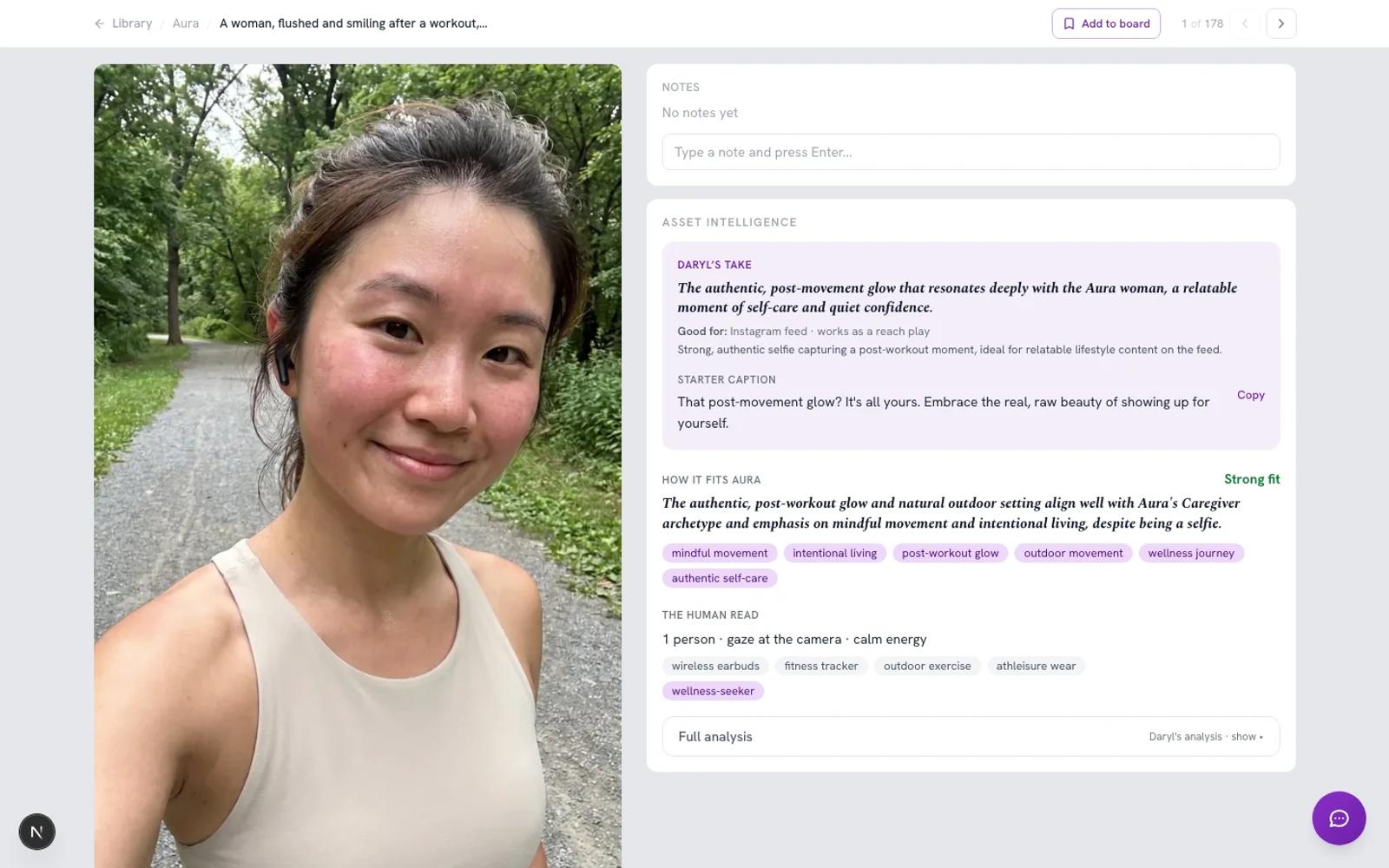
Asset Intelligence is what makes the library more useful. It combines asset analysis, Brand Context, semantic retrieval, and work-aware comparison so the marketer can inspect a ranked recommendation rather than a wall of unexplained results.
That distinction matters. Describing the product as only an add-on to another system understates the full DAM experience. Calling Asset Intelligence the company category makes it harder to understand what a user can actually do.
The simpler story is:
- DAMdaryl can be the complete asset library.
- DAMdaryl can also connect supported systems where approved assets already live.
- Asset Intelligence helps the marketer understand, find, and choose from that library.
Brand Context should guide, not hide
Brand-aware recommendations are only as useful as the context behind them.
DAMdaryl keeps Brand Context reviewable. A team can inspect the positioning, audience, voice, visual cues, pillars, and custom guidance that influence a recommendation. If the context is wrong or outdated, the answer is not to trust the score harder. It is to correct the context.
The recommendation experience follows the same principle. In Post Intelligence, Daryl shows candidate assets and reasons for their fit. The leading option can be challenged. Alternatives remain visible. The reasoning can be inspected rather than treated as a black box.
Start with an image description or a social post idea
Use Library search to describe a remembered image or the image you need. Include product, color, version and exclusions, and inspect the actual files and available filters.
For a social post or idea, use Post Intelligence to explore recommendations with supplied Brand Context and reasons for fit. These are separate product workflows. No formal brief is needed, and neither a unified router nor an automatic saved-Work follow-up trail is promised.
The marketer still decides
Asset Intelligence should create informed disagreement, not artificial certainty.
The best outcome is not that Daryl is always right. It is that the marketer can reach a stronger decision with less unnecessary searching and more of the relevant evidence in view.
Sometimes the top recommendation will be the obvious choice. Sometimes the second option will better fit a nuance Daryl could not know. Sometimes the result will reveal a real gap in the library.
All three outcomes are useful when the reasoning stays visible.
Finding the right existing asset is the customer problem. Visible reasoning can help explain relevance and support the choice that follows; it does not turn a literal mismatch into a match.
Describe an image or tell Daryl what you’re making. Use Library search for image descriptions, or Post Intelligence for a social post idea. Inspect the asset and available reasons before choosing.