A Smart DAM Should Find the Beach—and Help You Choose the Right One
A useful marketing library must support precise retrieval and the harder creative decision: which approved asset fits the work in front of the team?
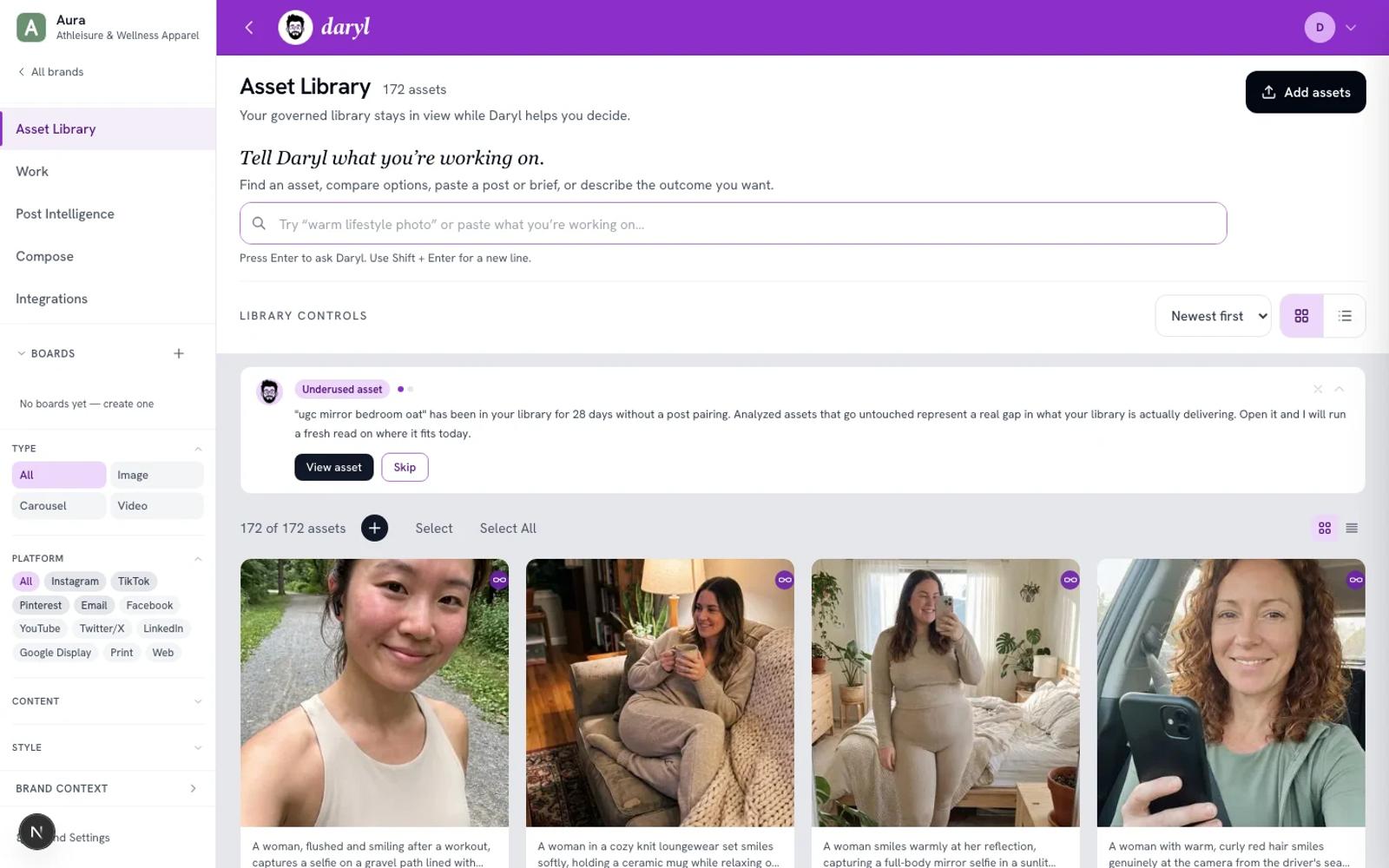
Updated 23 October 2026: Product descriptions now distinguish Library image search from the separate social Post Intelligence workflow. Finding existing assets leads; brand-aware reasons support inspection. No automatic route-to-saved-Work or selection-to-Compose path is claimed. Original publication date retained.
You need an image for a campaign launch. You remember the shoot: warm light, an open horizon, a person who looks confident without looking staged. The library contains the file. The hard part is turning that memory—and the direction in your head—into a useful shortlist.
That is where a smart DAM has to do two jobs well.
First, it has to behave like a real asset library. You should be able to browse everything, search by meaning, narrow with familiar controls, inspect metadata, collect useful selections on boards, and keep the approved source visible.
Second, it should help when the question changes from "Where is the file?" to "Which asset fits this work?"
DAMdaryl is built around both jobs.
Search and selection are related, but they are not the same
Sometimes you know what you need. You want a beach image, a product detail, a vertical composition, or a shot from a particular campaign. That is a search problem. A good semantic search should understand natural language without taking away precise filters and library controls.
Other times, the request is not a description of the file. It is a description of the effect the work needs to create:
- optimistic without feeling polished;
- premium but still human;
- energetic enough for a launch, not so loud that it breaks the brand;
- confident for an executive audience without falling into a generic corporate look.
That is an asset decision. The library still matters, but retrieval alone is not the finish line.
Asset Intelligence adds a point of view to the library
DAMdaryl analyzes the visual and strategic signals available in an asset: subject, setting, composition, mood, color, production style, likely audience cues, platform considerations, and how the asset relates to the active Brand Context.
Those signals are useful in two ways.
They make the library easier to search by meaning. A marketer can describe the visual or emotional direction they need instead of guessing the filename or exact tag.
They also give Daryl evidence for a recommendation. In Post Intelligence, a marketer can bring a social post or idea and review candidate assets with reasons tied to the active brand and post direction. Library image search is a separate workflow.
The explanation is important. A score by itself can look authoritative without being useful. DAMdaryl keeps the reasoning, the alternative assets, and the request and available reasons visible so the marketer can inspect, refine, or override the call.
Brand Context changes the question
The same beach image can play very different roles for different brands.
For one brand, an empty horizon may support independence and possibility. For another, the lack of people may make the asset feel lonely. A warm lifestyle photograph may feel appropriately candid in one visual system and inconsistent in another.
That is why DAMdaryl separates general asset analysis from Brand Context. The image has observable qualities of its own. The brand adds the strategic lens through which those qualities should be judged.
Brand Context is not a one-time magic profile. It is a reviewable foundation: positioning, audience, voice, visual cues, content pillars, and the custom context the team wants Daryl to consider. As campaigns and visual direction evolve, the team can refine it.
The library remains first-class
A smart DAM should not hide the asset library behind a chatbot.
A marketer who simply wants semantic DAM search can open the library, describe the asset they need, use the filters, browse the results, and inspect the details. No work session is required just to search.
For a social post or idea, open Post Intelligence separately to explore recommendations with reasons. Library search and Post Intelligence have different inputs and next steps; a search is not automatically routed into saved Work.
That creates one product with two clear paths:
- Use DAMdaryl as the complete asset library. Upload, organize, inspect and search assets, then collect selections on boards. Review sharing and source actions within their supported routes.
- Connect a supported source. Keep approved assets in a system your team already uses while DAMdaryl provides a normalized search, analysis, and recommendation experience.
Check each supported source’s import, sync, access and next-action behavior. A connection does not establish identical behavior across every route.
The goal is not to automate taste
Daryl does not replace the marketer, brand lead, or creative team making the call. He makes the call easier to inspect.
The product is successful when a person can see the full library, understand why certain assets surfaced, compare credible alternatives, and make a stronger decision without losing the controls a DAM user expects.
The beach still matters. So do the metadata, the rights, the source, and the folder it came from.
But when the work needs optimism, confidence, intimacy, or momentum, a smart DAM should help the team decide which beach image can actually carry it.
Tell Daryl what you’re working on. Build a complete DAMdaryl library or connect a supported source, then test the recommendation against a real piece of marketing work.